Home / Settings
Settings
What it means to open the same database twice, how updates arrive, and what every preference in the Settings dialog actually changes.
A shortcut per database
If you maintain more than one database, HCDB and a mod's build, say, make
one shortcut per database, each pointing at the program
(hcpe.exe on Windows) with that database's
.hcpe.json as its argument. Each shortcut launches
its own instance of the editor, so opening two of them opens two windows,
each on its own database, at the same time. If the file a shortcut names has
been moved, the editor says so and opens the last project instead.
The Settings dialog
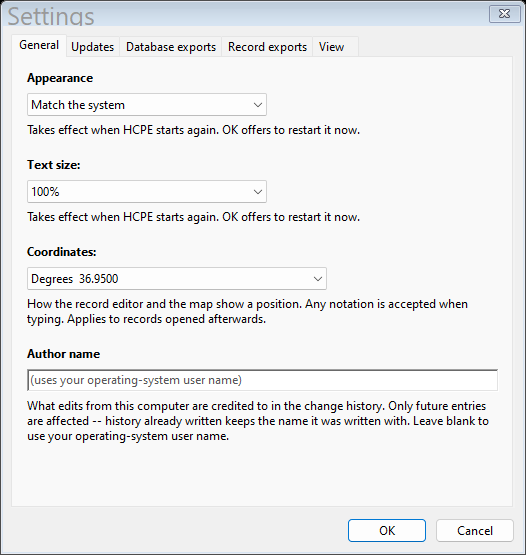
Tools and reports → Settings… holds the preferences a person using the editor sets for themselves, on five tabs: General (appearance, coordinates and author name), Updates, Database exports, Record exports and View.
Appearance
Match the system, light, or dark. Takes effect the next time you start the editor. On Linux the choice is switched off and the editor follows the desktop's own light/dark theme.
Coordinates
How a record's latitude and longitude, and the map, show a position: plain degrees, degrees with N/S and E/W, or degrees-minutes-seconds with or without N/S and E/W. The dialog shows each notation with a sample reading. Any notation is accepted when you type one, and a change applies to records opened afterwards.
Author name
What edits from this computer are credited to in the change log. Left blank, it falls back to the account you are logged into the machine as; whatever you type here is remembered across launches, the same as every other Settings choice. Only future entries are affected: history already written keeps the name it was written with.
Updates
Off until you say otherwise: the first time you run the editor it asks, once, whether to check for a newer version once a day. The check sends the product name, the version and the operating system, and nothing else, no identifier, and nothing at all about the database you have open. Whichever way you answer, you are not asked again, and you can change your mind on the Updates tab (Check for updates automatically, once a day). Help → Check for updates… checks right now whether that box is ticked or not.
Nothing is ever downloaded or installed without being asked. When there is a newer version you get a bar under the search box at the top of the main window, not a dialog and never at startup, with Update now, Later and Skip this version. The About screen (Help → About) always says how the last check went, in plain words, including when it failed and why, and keeps an update log of each step an update took.
The channel decides which builds you are offered. Stable is released builds, what everyone else runs and where to leave it. Beta is release candidates, worth having if you report problems. Test is alpha builds, and they break. Check for updates always names the channel it asked. A channel that has not published any version yet says exactly that, rather than reporting an error, and on Stable or Beta it adds that there may be a test build on the Test channel. Only you change the channel; nothing in the editor moves you to another one.
An update is verified before it is run: the editor checks a signature made with a key that never touches the web host, and the file's checksum, and refuses anything that does not match. Because the program is a folder (the executable and its two OpenSSL files on Windows), an update replaces all of it, and keeps the previous copies until the new version has started properly. If the folder is one you cannot write to, the bar says so and does not offer Update now, rather than asking for administrator rights: install the new version the way you installed this one. A copy of the editor built from source rather than from a release never offers Update now.
Database exports
Name an exported .res after: the database's own name
(the default, which tells one build from another), commondb.res
(what the game picks up on its own), or the database's name without its date
(one file per database rather than per build, overwritten by later exports).
Each choice shows the file name it would give for the database you have open.
This sets only the name the Save dialog starts with; you can change it every
time. The project file is always named after the database.
Offer the project file with every .res makes an export
ask, right after saving the .res, whether to save the
.hcpe.json beside it, since the .res cannot carry
the change history, the authorship or the record ids.
Structure version chooses the format of the
.res files you write: version 6 (the default) or version 5. What
that means, and when to pick 5, is in
Database versions and battlesets.
Record exports
Include change history is the default for record packages: a package then carries who edited what and when. Untick it before exporting to someone who should not see that.
View
Reset grid columns forgets every extra column you added to an annex grid, every column you hid and every width you dragged. Reset collapsed sections makes every record screen open with all its sections expanded again. Both take effect on screens opened afterwards.
Where this is kept
Settings, the last database you had open, and the window's own size and position all live in one local state file on this machine, keyed by database, and survive a relaunch.